Check and adjust CHM tree detection
You are viewing in-progress documentation for v2. Switch to the stable version for the current production release.
Generate a tree inventory from a CHM
places one tree at each peak the detection algorithm finds in the canopy height
model, and its settings decide what counts as a peak. The defaults — lmf,
footprint_size 3, min_height 2 — are a starting point, not a fit for your
stand, and a finished inventory gives no warning when they are wrong.
Detection goes wrong in three ways:
- One crown, several trees (over-detection).
- Several crowns, one tree (under-detection).
- Trees where there are none: on low shrubs taller than
min_height, and on buildings or power lines.
How tree detection from a CHM works explains why each happens.
The tree count alone cannot tell you which of these you have: a plausible count can hide over-detection in one stand and under-detection in the next. This guide runs a few candidate settings on the same CHM and compares them over a close-up you can judge by eye.
Prerequisites
Section titled “Prerequisites”-
An API key: my-api-key.
-
A domain (your-domain-id) with a completed CHM grid (your-chm-grid-id). Step 1 of Generate a tree inventory from a CHM builds one.
-
Python with
fastfuels-sdkandmatplotlib, for the overlay.
Step 1 — Detect with a few candidate settings
Section titled “Step 1 — Detect with a few candidate settings”Each candidate is an ordinary tree inventory from the same CHM grid. Change one setting at a time against the default, so that each comparison shows one effect:
curl -X 'POST' \ 'https://api-v2-prod-nyvjyh5ywa-uw.a.run.app/domains/your-domain-id/inventories/tree/chm' \ -H 'accept: application/json' \ -H 'api-key: my-api-key' \ -H 'Content-Type: application/json' \ -d '{ "name": "lmf, footprint_size 9", "source_chm_grid_id": "your-chm-grid-id", "algorithm": { "name": "lmf", "min_height": 2, "footprint_size": 9 }}'Send one request per candidate, changing only the algorithm block.
import fastfuels_sdk.v2 as fffrom fastfuels_sdk.v2.client_library.models import StemIsolationLmf, StemIsolationVwf
ff.set_api_key("my-api-key")
domain = ff.Domain.from_id("your-domain-id")chm = ff.get_grid(domain, "your-chm-grid-id")
# Each candidate is one tree inventory, detected from the same CHM.candidates = {    "lmf, footprint_size 3": StemIsolationLmf(min_height=2, footprint_size=3),    "lmf, footprint_size 9": StemIsolationLmf(min_height=2, footprint_size=9),    "vwf, default window": StemIsolationVwf(min_height=2),    "lmf, footprint_size 3, min_height 8": StemIsolationLmf(min_height=8, footprint_size=3),}inventories = {    label: ff.inventories.create_tree_inventory_from_chm_grid(domain, chm, algorithm=algorithm, name=label)    for label, algorithm in candidates.items()}for label, inventory in inventories.items():    inventory.wait()    count = inventory.to_dict()["columns"][0]["summary"]["count"]    print(f"{label}: {count:,} trees")
{ "id": "your-inventory-id", "domain_id": "your-domain-id", "type": "tree", "name": "lmf, footprint_size 9", "description": "", "status": "pending", "progress": null, "created_on": "2026-10-30T22:29:31.189546", "modified_on": "2026-10-30T22:29:31.189546", "checksum": "9b24fa54832b41f0b9d79423bf79ba54", "source": { "name": "chm", "source_chm_grid_id": "your-chm-grid-id", "source_chm_grid_checksum": "44ed51bff70143f09b575154c2089f1b", "algorithm": { "name": "lmf", "min_height": 2.0, "max_height": 120.0, "footprint_size": 9 }, "crown_segmentation": null }, "modifications": [], "treatments": [], "columns": [ { "key": "tree_id", "type": "categorical", "unit": null, "summary": null }, { "key": "x", "type": "continuous", "unit": "m", "summary": null }, { "key": "y", "type": "continuous", "unit": "m", "summary": null }, { "key": "height", "type": "continuous", "unit": "m", "summary": null } ], "forestry_metrics": null, "georeference": null, "error": null, "tags": []}On the Blue Mountain domain the four candidates detect:
lmf, footprint_size 3: 8,040 treeslmf, footprint_size 9: 6,556 treesvwf, default window: 7,369 treeslmf, footprint_size 3, min_height 8: 6,401 treesA spread of 1,600 trees across 116 ha says the settings matter here. It does not say which one is right.
Step 2 — Overlay them on the same close-up
Section titled “Step 2 — Overlay them on the same close-up”Draw each candidate’s treetops over one close-up of the CHM. Pick a window that holds both dense canopy and open ground, small enough (about 60 m) that single crowns are legible. This continues from the code above:
import matplotlib.pyplot as plt
# A close-up, in metres from the CHM's south-west corner. Keep it small enough# (about 60 m) that single crowns are legible.X0, Y0, SIZE = 1060, 410, 60
height = chm.to_numpy("chm")dx, _, west, _, dy, north = chm.georeference.transformsouth = north + dy * height.shape[0]extent = (west, west + dx * height.shape[1], south, north)x0, y0 = west + X0, south + Y0
fig, axes = plt.subplots(1, len(inventories), figsize=(4 * len(inventories), 4.4), sharey=True)for ax, (label, inventory) in zip(axes, inventories.items()):    trees = inventory.to_dataframe()    ax.imshow(height, extent=extent, cmap="Greens", vmin=0, vmax=30, interpolation="nearest")    ax.scatter(trees.x, trees.y, s=16, c="#d6336c", edgecolors="white", linewidths=0.6)    ax.set(xlim=(x0, x0 + SIZE), ylim=(y0, y0 + SIZE), aspect="equal", title=label)fig.savefig("candidates.png", dpi=150)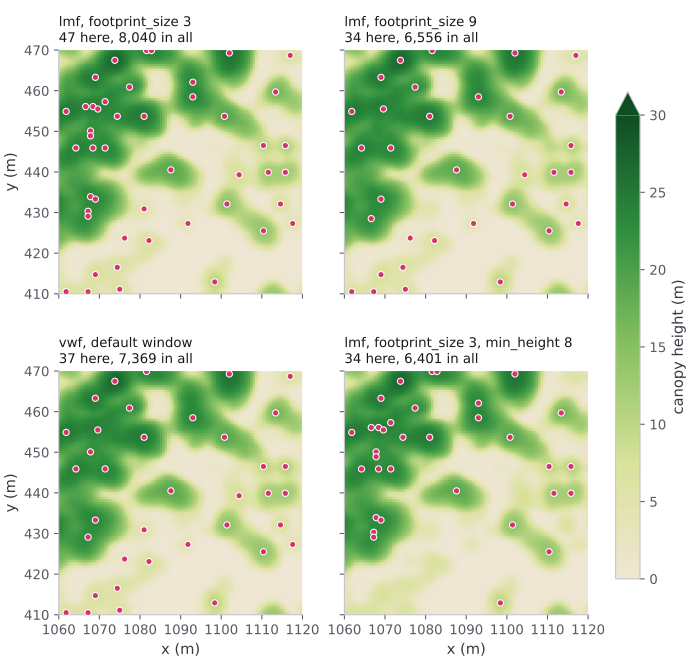
Four candidates over one 60 m close-up of the Blue Mountain NAIP CHM.
Footprint 3 places 47 treetops here, 13 of them under 8 m on the open ground;
footprint 9 places 34, the default vwf window 37, and footprint 3 with
min_height 8 places 34, none under 8 m.
Read the panels against each other:
- Footprint 3 puts clusters of dots on the large crowns at the top left — several trees per crown — and dots across the low vegetation below.
- Footprint 9 clears most of the clusters. The dots on the open ground stay.
vwfthins the clusters less than footprint 9 does. Its dots on the open ground stay too.min_height8 clears the open ground and does nothing about the clusters.
footprint_size is in pixels: multiply by the CHM’s cell size for the
window in metres. On this 0.6 m NAIP grid, 3 px is 1.8 m and 9 px is 5.4 m; on a
1 m lidar CHM the same numbers mean 3 m and 9 m.
Step 3 — Choose
Section titled “Step 3 — Choose”Match what you see to the change that fixes it:
| You see | Cause | Change |
|---|---|---|
| Several dots on one crown | Window smaller than the crown | Raise footprint_size, or switch to vwf |
| One dot on two crowns you can see apart | Window wider than the gap between them | Lower footprint_size, or lower vwf’s crown_ratio or crown_offset |
| Dots on low shrubs or open ground | min_height below the shrub layer | Raise min_height |
| Dots in lines or on roofs | Power lines or buildings | Remove them with a spatial modification; see Remove trees with features |
Settings combine: here, vwf with a raised min_height addresses both the
clusters and the open ground. Detect the combination as one more candidate and
overlay it the same way.
Then decide:
- By eye. Prefer the candidate whose dots sit one per visible crown. Check two or three close-ups that look like most of your domain, not only the densest one.
- Against field data, if you have it. Compare the detected trees per hectare
with plot counts of overstory trees taller than
min_height. Compare against the overstory only: detection cannot see trees beneath the dominant canopy, so it will always undercount total stems (why).
Keep the candidate you chose and delete the others, with inventory.delete() in
the SDK or DELETE /domains/{domain_id}/inventories/{inventory_id}. Each
candidate is a full inventory and counts toward your
quotas.
Open it in a GIS instead
Section titled “Open it in a GIS instead”To inspect detection in QGIS or ArcGIS rather than Python, export the CHM grid
as a GeoTIFF and an inventory as GeoJSON. Exports are asynchronous: the create
call returns an export in status: "pending", which you poll until
completed.
curl -X 'POST' \ 'https://api-v2-prod-nyvjyh5ywa-uw.a.run.app/domains/your-domain-id/grids/your-chm-grid-id/exports/geotiff' \ -H 'accept: application/json' \ -H 'api-key: my-api-key' \ -H 'Content-Type: application/json' \ -d '{ "name": "Blue Mountain NAIP CHM", "bands": ["chm"]}'curl -X 'POST' \ 'https://api-v2-prod-nyvjyh5ywa-uw.a.run.app/domains/your-domain-id/inventories/your-inventory-id/exports/geojson' \ -H 'accept: application/json' \ -H 'api-key: my-api-key' \ -H 'Content-Type: application/json' \ -d '{ "name": "Treetops"}'curl -X 'GET' \ 'https://api-v2-prod-nyvjyh5ywa-uw.a.run.app/exports/your-export-id' \ -H 'accept: application/json' \ -H 'api-key: my-api-key'import fastfuels_sdk.v2 as ff
ff.set_api_key("my-api-key")
# .export() creates the job, .wait() polls it to completion, and .to_file()# downloads the signed URL — no manual polling or signed-URL handling.chm = ff.get_grid("your-domain-id", "your-chm-grid-id")chm_export = chm.export(format="geotiff", name="Blue Mountain NAIP CHM")chm_export.wait()chm_export.to_file("chm.tif")
inventory = ff.get_inventory("your-domain-id", "your-inventory-id")treetops_export = inventory.export(format="geojson", name="Treetops")treetops_export.wait()treetops_export.to_file("treetops.geojson")Each export has its own id (your-export-id). A completed export
carries a signed_url: a direct download that needs no API key and stays valid
for seven days. It is what the SDK’s .to_file() downloads.
{ "id": "your-export-id", "domain_id": "your-domain-id", "name": "Blue Mountain NAIP CHM", "description": "", "status": "completed", "progress": { "percent": 100, "message": "Complete" }, "created_on": "2026-10-30T22:29:31.466795Z", "modified_on": "2026-10-30T22:29:32.615009Z", "source": { "grid_id": "your-chm-grid-id", "bands": ["chm"], "name": "geotiff" }, "signed_url": "https://storage.googleapis.com/silvx-fastfuels-exports-v2/your-export-id/Blue_Mountain_NAIP_CHM.tif?X-Goog-Algorithm=GOOG4-RSA-SHA256&X-Goog-Credential=...&X-Goog-Date=...&X-Goog-Expires=604800&X-Goog-SignedHeaders=host&response-content-disposition=attachment%3B%20filename%3D%22Blue_Mountain_NAIP_CHM.tif%22&X-Goog-Signature=...", "expires_on": "2026-11-06T22:29:31.466795Z", "error": null, "tags": []}{ "id": "your-export-id", "domain_id": "your-domain-id", "name": "Treetops", "description": "", "status": "completed", "progress": { "percent": 100, "message": "Complete" }, "created_on": "2026-10-30T22:29:35.083100Z", "modified_on": "2026-10-30T22:29:36.757741Z", "source": { "crs": "EPSG:32611", "name": "geojson", "inventory_id": "your-inventory-id", "columns": null }, "signed_url": "https://storage.googleapis.com/silvx-fastfuels-exports-v2/your-export-id/Treetops.geojson?X-Goog-Algorithm=GOOG4-RSA-SHA256&X-Goog-Credential=...&X-Goog-Date=...&X-Goog-Expires=604800&X-Goog-SignedHeaders=host&response-content-disposition=attachment%3B%20filename%3D%22Treetops.geojson%22&X-Goog-Signature=...", "expires_on": "2026-11-06T22:29:35.083100Z", "error": null, "tags": []}With curl, download each signed_url yourself:
curl -o chm.tif "<CHM_SIGNED_URL>"curl -o treetops.geojson "<TREETOPS_SIGNED_URL>"Exports are not deleted with their domain; delete each one when you are done
with DELETE /exports/{export_id}, or export.delete() in the SDK.
Next steps
Section titled “Next steps”- Understand the trade-off — How tree detection from a CHM works: why a treetop is a local maximum, and fixed versus variable windows.
- Re-check after changing source — the same settings land differently on a NAIP CHM and a lidar CHM; see The source changes the answer.
- Fill in the rest — run GDAM allometry on the inventory you kept, for diameter, crown ratio, and species.