Tune CHM tree detection
You are viewing in-progress documentation for v2 (Beta). Switch to the stable version for the current production release.
Tree detection has no universally correct settings — the right footprint_size,
min_height, or VWF window depends on how your stand is spaced. The way to
choose is to look: export the CHM and the detected treetops, overlay them,
and check whether each point lands on a distinct crown. This guide runs one
round of that loop; repeat it, adjusting parameters, until the points track the
crowns you can see.
For what over- and under-detection look like — and which knob fixes each — see How tree detection from a CHM works. For the full request schema and every field default, see the live API reference.
Prerequisites
Section titled “Prerequisites”-
An API key: my-api-key.
-
A domain (your-domain-id) with a completed CHM grid (your-chm-grid-id) and at least one tree inventory (your-inventory-id) to inspect. See Generate a tree inventory from a CHM.
-
A local environment with
fastfuels-sdk(for the export step) plusrasterioandmatplotlib(for the overlay).
Step 1 — Export the CHM and the treetops
Section titled “Step 1 — Export the CHM and the treetops”Export the CHM grid as a GeoTIFF and the inventory as GeoJSON, then download
both. The exports are asynchronous: the create call returns an export in
status: "pending", which you poll until completed.
curl -X 'POST' \ 'https://api-v2-prod-nyvjyh5ywa-uw.a.run.app/domains/your-domain-id/grids/your-chm-grid-id/exports/geotiff' \ -H 'accept: application/json' \ -H 'api-key: my-api-key' \ -H 'Content-Type: application/json' \ -d '{ "name": "Blue Mountain NAIP CHM", "bands": ["chm"]}'curl -X 'POST' \ 'https://api-v2-prod-nyvjyh5ywa-uw.a.run.app/domains/your-domain-id/inventories/your-inventory-id/exports/geojson' \ -H 'accept: application/json' \ -H 'api-key: my-api-key' \ -H 'Content-Type: application/json' \ -d '{ "name": "Treetops"}'curl -X 'GET' \ 'https://api-v2-prod-nyvjyh5ywa-uw.a.run.app/exports/your-export-id' \ -H 'accept: application/json' \ -H 'api-key: my-api-key'import fastfuels_sdk.v2 as ff
ff.set_api_key("my-api-key")
# .export() creates the job, .wait() polls it to completion, and .to_file()# downloads the signed URL — no manual polling or signed-URL handling.chm = ff.get_grid("your-domain-id", "your-chm-grid-id")chm_export = chm.export(format="geotiff", name="Blue Mountain NAIP CHM")chm_export.wait()chm_export.to_file("chm.tif")
inventory = ff.get_inventory("your-domain-id", "your-inventory-id")treetops_export = inventory.export(format="geojson", name="Treetops")treetops_export.wait()treetops_export.to_file("treetops.geojson")Each export returns an id (your-export-id). A completed export carries
the signed_url — a direct download, no API key needed, valid for seven days.
It is the object the SDK’s .wait() returns and .to_file() downloads:
{ "id": "your-export-id", "domain_id": "your-domain-id", "name": "Blue Mountain NAIP CHM", "description": "", "status": "completed", "progress": { "percent": 100, "message": "Complete" }, "created_on": "2026-06-05T14:40:33.809172Z", "modified_on": "2026-06-05T14:40:36.193701Z", "source": { "bands": ["chm"], "name": "geotiff", "grid_id": "your-chm-grid-id" }, "signed_url": "https://storage.googleapis.com/silvx-fastfuels-exports-v2/your-export-id/Blue_Mountain_NAIP_CHM.tif?X-Goog-Algorithm=GOOG4-RSA-SHA256&X-Goog-Expires=604800&X-Goog-SignedHeaders=host&X-Goog-Signature=...", "expires_on": "2026-06-12T14:40:33.809172Z", "error": null, "tags": []}{ "id": "your-export-id", "domain_id": "your-domain-id", "name": "Treetops", "description": "", "status": "completed", "progress": { "percent": 100, "message": "Complete" }, "created_on": "2026-06-05T14:40:39.524329Z", "modified_on": "2026-06-05T14:40:42.579151Z", "source": { "columns": null, "crs": "EPSG:32611", "name": "geojson", "inventory_id": "your-inventory-id" }, "signed_url": "https://storage.googleapis.com/silvx-fastfuels-exports-v2/your-export-id/Treetops.geojson?X-Goog-Algorithm=GOOG4-RSA-SHA256&X-Goog-Expires=604800&X-Goog-SignedHeaders=host&X-Goog-Signature=...", "expires_on": "2026-06-12T14:40:39.524329Z", "error": null, "tags": []}With curl, download each signed_url yourself (the Python SDK path already
wrote both files via .to_file()):
curl -o chm.tif "<CHM_SIGNED_URL>"curl -o treetops.geojson "<TREETOPS_SIGNED_URL>"Step 2 — Overlay and inspect
Section titled “Step 2 — Overlay and inspect”With chm.tif and treetops.geojson in hand (both in the domain CRS), plot the
treetops over a close-up of the CHM:
"""Overlay detected treetops on the CHM to judge detection quality.
Reads the two files you downloaded from the export signed URLs:  chm.tif          — the exported CHM grid (geotiff)  treetops.geojson — the exported tree inventory (geojson, same CRS)
Writes overlay.png: detected treetops as dots over a close-up of the CHM.Run it for each candidate inventory and compare the overlays."""import json
import matplotlib.pyplot as pltimport numpy as npimport rasterio
WINDOW_M = 175.0  # side length of the close-up window, in CHM map units (m)
with rasterio.open("chm.tif") as src:    chm = src.read(1, masked=True)    b = src.bounds    extent = (b.left, b.right, b.bottom, b.top)
# A close-up window — small enough that individual treetops are legible.x0, y0 = b.left + 175.0, b.bottom + 40.0x1, y1 = x0 + WINDOW_M, y0 + WINDOW_M
pts = np.array([    f["geometry"]["coordinates"][:2]    for f in json.load(open("treetops.geojson"))["features"]])inside = (pts[:, 0] >= x0) & (pts[:, 0] <= x1) & (pts[:, 1] >= y0) & (pts[:, 1] <= y1)
fig, ax = plt.subplots(figsize=(7, 7))ax.imshow(chm, extent=extent, origin="upper", cmap="Greens",          vmax=np.percentile(chm.compressed(), 99))ax.scatter(pts[inside, 0], pts[inside, 1], s=14,           facecolor="white", edgecolor="black", linewidth=0.5)ax.set_xlim(x0, x1)ax.set_ylim(y0, y1)ax.set_xticks([])ax.set_yticks([])ax.set_title(f"{int(inside.sum())} treetops in a {WINDOW_M:.0f} m window")fig.savefig("overlay.png", dpi=150, bbox_inches="tight")print(f"{int(inside.sum())} treetops in view -> overlay.png")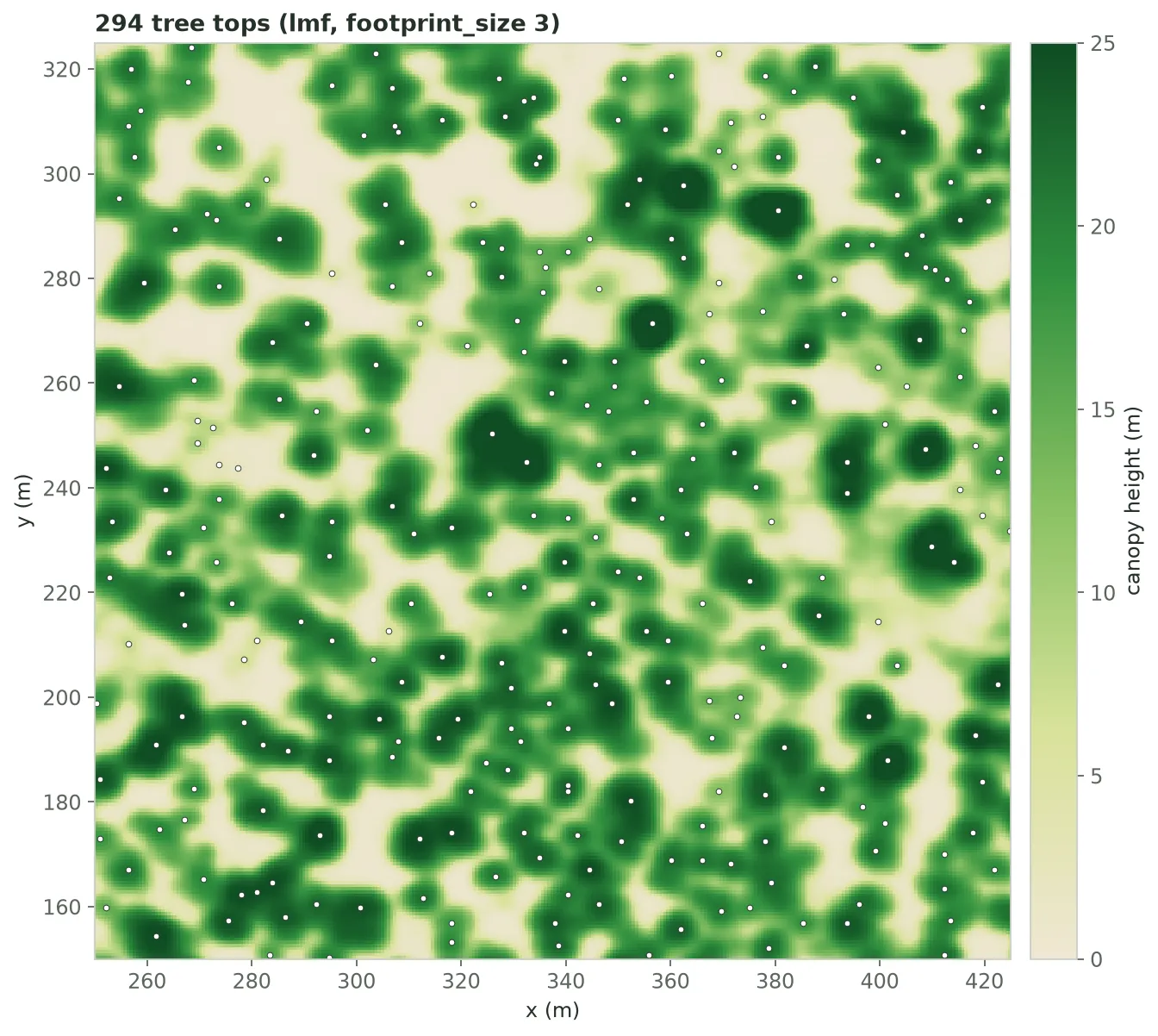
A real, untuned result — not an ideal one. Most crowns carry one dot, but where crowns touch, some carry two, and a few low patches of canopy get a dot of their own. Weighing trade-offs like these is the point of inspecting the overlay.
Step 3 — Read it and adjust
Section titled “Step 3 — Read it and adjust”Compare the dots to the canopy and re-create the inventory with new parameters:
- Several dots on one crown (over-detection) → enlarge
footprint_size, or switch tovwf. - Obvious trees with no dot (under-detection) → shrink
footprint_size. - Dots on low shrubs or understory → raise
min_height. - Dots on rooftops or powerlines → NAIP-CHM includes structures; mask them (e.g. with building footprints) or restrict the domain to vegetated land.
Each knob moves the count in a predictable direction. On the Blue Mountain
domain (≈1 km², NAIP CHM, min_height 2 m), holding everything else fixed, the
whole-domain treetop count responds like this:
lmf footprint_size (px) | treetops |
|---|---|
| 3 | 8,040 |
| 5 | 7,541 |
| 7 | 7,175 |
| 9 | 6,556 |
A wider footprint forces peaks farther apart, so neighboring crowns merge and
the count falls. vwf instead grows the window with canopy height; its
crown_ratio sets how fast (window = crown_offset + crown_ratio × height):
vwf crown_ratio (at crown_offset 3.0) | treetops |
|---|---|
| 0.05 (default) | 7,369 |
| 0.10 | 7,122 |
| 0.15 | 6,840 |
| 0.20 | 6,594 |
With the default crown_offset of 3 m, every window is at least 3 m wide, so
the default vwf already finds fewer treetops than lmf with a 3-pixel
(1.8 m) footprint. Raising crown_ratio widens the window under tall trees and
brings the count down further.
These are one stand’s numbers, not targets: the right setting is the one whose
dots track the crowns in your overlay.
Then overlay again. Side-by-side examples of each effect — fixed vs. variable window, and the footprint-size trade-off — are in How tree detection from a CHM works.
These knobs balance detection of the visible canopy. Trees occluded beneath the dominant crowns can’t be recovered by tuning — see Detection resolves the dominant canopy for why a detected count undercounts the true stems.